

Sending sweet treats with Google Pub/Sub
In my contribution to the C# Advent 2025, I want to explore Google Pub/Sub and some of its features. I heard about this service from Google last year, and I wanted to explore its features. So when C# Advent 2025 announced this year’s Advent, I thought it was an excellent opportunity for me to learn about GCP and share some of that knowledge with the wider community. Thank you, C# Advent!

Google Pub/Sub is an asynchronous and scalable messaging service. It allows services to communicate asynchronously with latencies typically of the order of 100milliseconds. With Google Pub/Sub, you can decouple message producers from message consumers. The producer of the message or the publisher sends messages to the Pub/Sub service, and the Pub/Sub service delivers those messages to all the consumers of the messages or subscribers.
Here is a diagram that shows all the key components
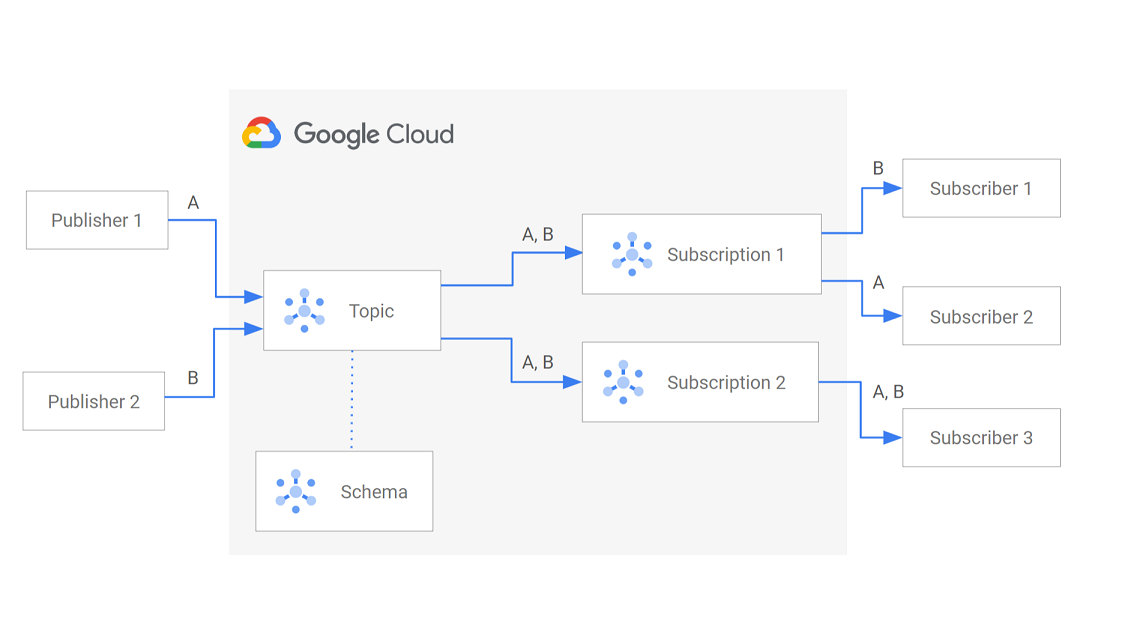
- Publisher - creates messages and sends them to the Pub/Sub Service on a specified topic
- Message - The data
- Topic - A named entity to which messages are published, this is your feed of messages
- Schema - Governs the data format of the message
- Subscription - A named entity that represents an interest in receiving messages on the topic
- Subscriber - applications that receive messages on a subscription
Let us look at the lifecycle of a message with Google Pub/Sub.

A publisher publishes messages to a Pub/Sub topic. The message is written to the storage. Pub/Sub also delivers the message to all the subscriptions of the topic. The subscriber receives the message from the subscription to which it is attached. The subscriber sends an acknowledgement back to Pub/Sub when the message has been processed. When all subscriptions on the topic have acknowledged a message, it is deleted from storage asynchronously.
A subscriber has to acknowledge the message (ack) within a configurable time window called the ackDeadline. Past this deadline, the message is available for delivery again. This means the subscribers have to be idempotent.
A message can also be unacknowledged (unacked) if the Pub/Sub service does not receive an ack within the ackDeadline.
Messages can also be negatively acknowledged (nacked). Nacking a message from a subscriber causes it to be redelivered according to the retry policy.
That's all the basics we need for now. So let us look at some code.
Publishing Messages
My sample publisher is a console app that sends sweet treats for your loved ones this festive season. I have already set up a Google Project and a Pub/Sub service in that project using the Google Console. See the guide on how to set it up here Quickstart: Publish and receive messages in Pub/Sub using the Google Cloud console | Google Cloud Documentation
Google CLI must also be installed, and you must be signed in to the CLI. Instructions on how to do this can be found at https://docs.cloud.google.com/pubsub/docs/publish-receive-messages-client-library#before-you-begin. Trust me, it works pretty neatly!
Setting up a Pub/Sub service also involves creating a topic, and a default subscription can be added when the topic is created. So I am all set to send festive treats! I have opted for all the basic settings in a topic.
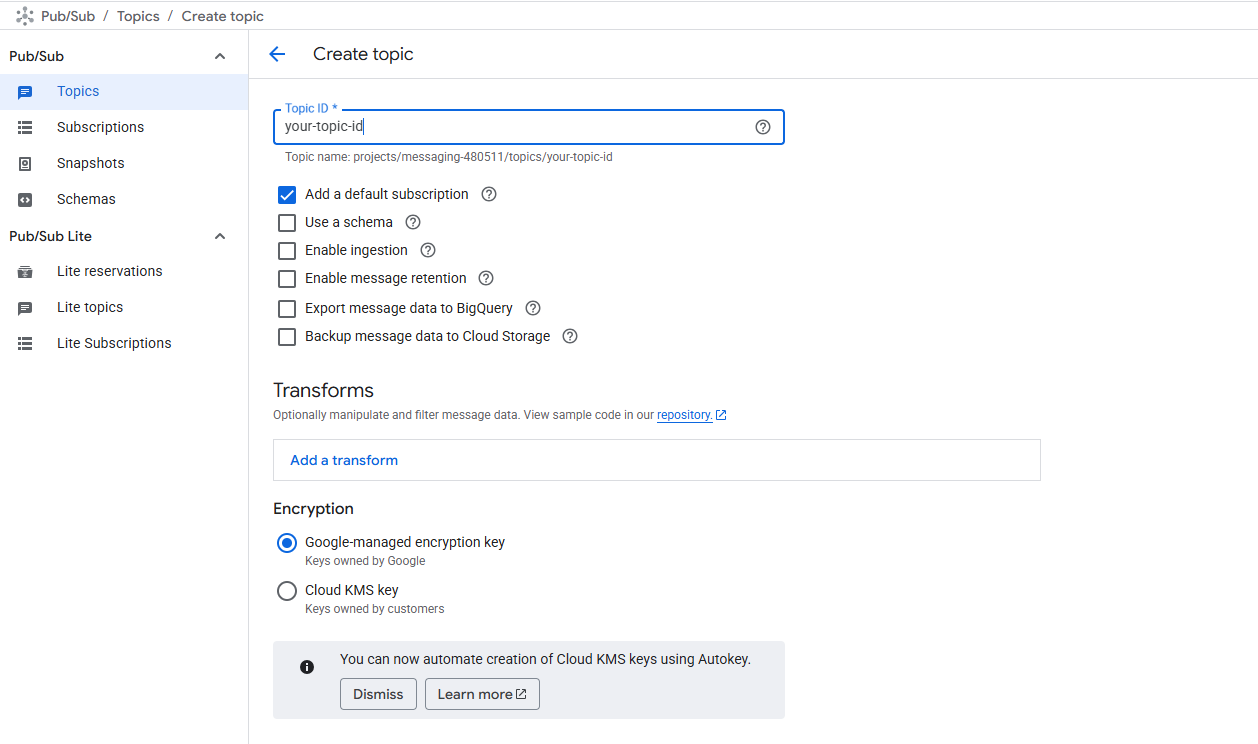
Let us look at how to publish messages into this topic. I am using the C# client library in my Console application, so I added the following package reference to the csproj. This library uses gRPC beneath the hood.
<PackageReference Include="Google.Cloud.PubSub.V1" Version="3.30.0" />
You can read more about the client libraries at Client libraries and Cloud APIs explained | Google Cloud SDK | Google Cloud Documentation
The most important part of my publisher is the SweetTreatPublisherService background service. The service is registered as a singleton at startup and gets the details of the sweets and the person you want to send them to.
public class SweetTreatPublisherService(IConfiguration configuration) : BackgroundService
{
    protected override async Task ExecuteAsync(CancellationToken stoppingToken)
    {
        TopicName topicName = TopicName.FromProjectTopic("project-id", "MyTopic");
        PublisherClient publisher = await PublisherClient.CreateAsync(topicName);

        while (!stoppingToken.IsCancellationRequested)
        {
            Console.WriteLine("What sweet treat do you want to send?");
            var sweet = Console.ReadLine();

            Console.WriteLine("Who do you want to send it to?");
            var person = Console.ReadLine();

            if (sweet is not null && person is not null)
            {
                var festiveTreat = new FestiveTreat(person, sweet);

                //the message to be sent
                var pubsubMessage = new PubsubMessage
                {
                    Data = ByteString.CopyFromUtf8(JsonConvert.SerializeObject(festiveTreat)), //has Newtonsoft as dependency
                    Attributes = { { "my-custom-key-1", "my-custom-value-1" } }
                };

                string messageId = await publisher.PublishAsync(pubsubMessage);

                Console.WriteLine($"Sent {sweet} to {person}... with messageId {messageId}");
            }
        }
    }

}

public record FestiveTreat
{
    public FestiveTreat()
    {
    }

    public FestiveTreat(string person, string sweet)
    {
        Person = person;
        Sweet = sweet;
    }

    public string Person { get; set; }
    public string Sweet { get; set; }
}
Pub/Sub Service adds a message id unique to the topic and a timestamp for when the Pub/Sub service receives the message.
There are two types of topics in Google Pub/Sub - Standard and Import. My demo uses a Standard topic. The import topic is used to stream data into Pub/Sub.
The message that is sent to the Pub/Sub service consists of message data and metadata.
- Message data - The data to be sent. It can be text or binary data
- Message Attributes - Optional key-value pairs that provide additional context and info about the message. They can be used for routing, filtering, and enriching message content. A message can have up to 100 attributes, where both key and value are strings. Attribute value must not exceed 1KB. The key cannot start with “
goog” and must be less than 256 bytes - Ordering Key - If you want ordered delivery of messages, an ordering key can be added. Messages with the same ordering key are expected to be delivered to a subscriber in the same order they were published.
A message must contain message data or one attribute. The maximum permitted message size is 10MB.
A topic uses three zones to store data. The Pub/Sub service supports synchronous replication to at least two zones and a best-effort replication to an additional 3rd zone. Replication is always within the region.
Let us now send some sweet treats by running the publisher.
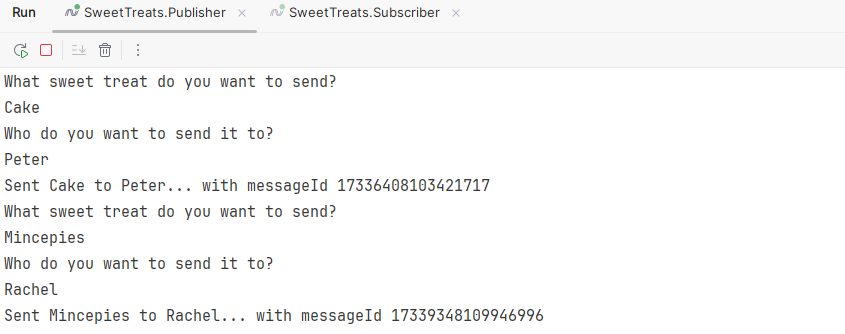
Let us now focus on some additional configurations available on a publisher.
Retry requests
With the client library, it is possible to retry publishing. Publishing failures can happen due to transient errors on the client-side. To safeguard against transient errors, a publisher retry policy can be specified that controls how the client library retries publish requests. You can select a constant or exponential backoff.
With constant backoff, the publish is retried at the specified backoff interval until the maximum number of attempts is specified.
var publisherCient = new PublisherClientBuilder
        {
            TopicName = topicName,

            Settings = new PublisherClient.Settings(){
            ApiSettings = new PublisherServiceApiSettings
            {
                PublishSettings = CallSettings.FromRetry(RetrySettings.FromConstantBackoff(
                        maxAttempts: maxAttempts, //maximum number of attempts
                        backoff:TimeSpan.FromSeconds(70),
                        retryFilter: RetrySettings.FilterForStatusCodes(StatusCode.Unavailable)))
                    .WithTimeout(totalTimeout),
            }

        };

        //asynchronously build the publisher
        var publisher = await publisherCient.BuildAsync();
        string message = await publisher.PublishAsync(messageText);
With exponential backoff, the delay between each retry increases by the backoff multiplier up to the maximum backoff and the request timeout increases by the multiplier up to the total timeout.
        var publisherCient = new PublisherClientBuilder
        {
            TopicName = topicName,
            ApiSettings = new PublisherServiceApiSettings
            {
                PublishSettings = CallSettings.FromRetry(RetrySettings.FromExponentialBackoff(
                        maxAttempts: maxAttempts, //maximum number of attempts
                        initialBackoff: initialBackoff, //back off time after the initial publish failure
                        maxBackoff: maxBackoff,
                        backoffMultiplier: backoffMultiplier,
                        retryFilter: RetrySettings.FilterForStatusCodes(StatusCode.Unavailable)))
                    .WithTimeout(totalTimeout),

            }
        };
Notice the use of the PublisherClientBuilder. This is a builder class PublisherClient to provide simple configuration of credentials, endpoint, client count, publication settings etc.
Batching
Pub/Sub limits a single batch to a maximum of 10MB size or 1000 messages in a single batch publish request.
var publisherCient = new PublisherClientBuilder
        {
            TopicName = topicName,
            Settings = new PublisherClient.Settings(){
                BatchingSettings = new BatchingSettings(
                    elementCountThreshold: 50,
                    byteCountThreshold: 10240,
                    delayThreshold: TimeSpan.FromMilliseconds(500)),
                },

        };
Compress messages
Messages can also be compressed before sending, with text-based data such as JSON or XML being more compressible. The compression ratio is better when the payload is on the order of kilobytes. When used together with batching, this can yield good results. This can be useful in bandwidth-constrained scenarios and save on networking costs. GZip is used for the Pub/Sub compression.
EnableCompression enables compression and CompressionBytesThreshold specifies the threshold for the number of bytes in a message batch before compression is applied.
var publisherCient = new PublisherClientBuilder
        {
            TopicName = topicName,
            Settings = new PublisherClient.Settings(){EnableCompression = true,CompressionBytesThreshold = 60000}
        };
Some other options, such as flow control and concurrency control, are not supported in the .NET client library.
Using schema
A Pub/Sub schema is an optional feature to enforce the format of the data field in a pub/sub message. A Schema establishes a contract between the publisher & subscriber about the format of the messages, Pub/Sub enforces this format. The message schema defines the names and data types for the fields in a message. When associated with a topic, messages that do not conform to the schema are not published. Pub/Sub supports Apache Avro 1.11, Protocol Buffers proto2 and proto3. A schema can be associated with a topic in the console, even after the topic has been created. But once a schema has been associated with a topic, every message published into the topic must follow the schema. If not, an INVALID_ARGUMENT error is returned to the publish request.
The schema of a message is validated at the time of publishing. Committing a new schema revision or changing the schema associated with a topic after publishing a message does not re-evaluate the message or change any of the schema message attributes.
Subscriptions
Now, let us talk about processing the sweet treats (our messages). In reality, it could be sending a message to the Elves who are hard at work, but for this demo, we will receive the message and process it by writing to the console.
To receive messages published to the topic, a subscription must be created. Only messages published to the topic after the subscription has been created are available to the subscriber attached to the subscription.
By default, Pub/Sub guarantees at-least-once delivery with no ordering guarantees.
As shown earlier, a default subscription has already been set up for me while creating the topic.
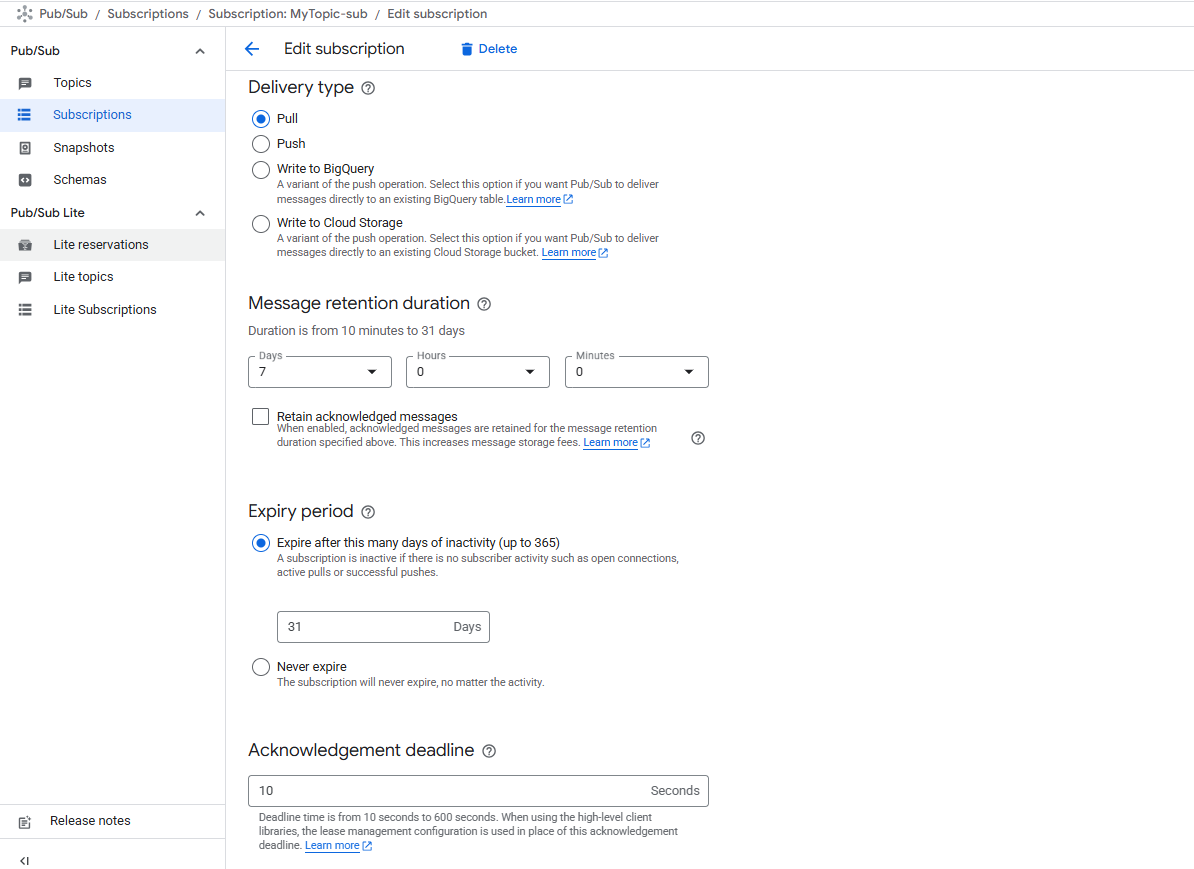
The subscription is set up using the default options. Unacknowledged messages are retained for 7 days. And if the subscription is inactive for 31 days with no open connections, active pulls or successful pushes, then the subscription expires. The subscription is a "pull" subscription.
Pub/Sub supports two types of subscriptions - Pull Subscriptions and Push Subscriptions
Pull Subscriptions
In Pull Subscriptions, the subscriber client requests messages from Pub/Sub. The subscriber issues a PullRequest or a StreamingPullRequest. The service responds with zero or more messages and their acknowledgementIDs. The subscriber calls the ack with the acknowledgementId to ack the message and note that it does not need redelivery.
The Pull API is a traditional unary RPC based on request-response model. A single pull response corresponds to a single pull request. It does not guarantee low latency and high throughput. Use this API if you need to control the number of messages subscribers can process and manage client memory and resources.
The StreamingPull API, on the other hand, is based on the bi-directional streaming in gRPC. It relies on a persistent bidirectional connection to receive multiple messages as they become available. It provides maximum throughput and lowest latency. Pub/Sub can close connections after a period of time to avoid long-running, sticky connections; in that case, the client library automatically reconnects and opens a new connection.
Once the message has been received, its processing can be synchronous or asynchronous. In asynchronous pull mode, receiving and processing are decoupled. This is the default mode, offering lower latency and higher throughput. With the synchronous pull mode, receiving and processing occur sequentially and are not decoupled. Use when the application is limited to a synchronous programming model or requires fine-grained control over resources; in that case, this can be combined with the Pull API.
When using a pull subscription, the client library can extend the ackDeadline by up to an hour using the modifyAckDeadline request.
In my example, my subscriber is a console app tied to the above pull subscription. It pulls messages from the subscription. I am using the same client library as my publisher and most of the code tha processes the message is in the SweetTreatProcessorService.
public class SweetTreatProcessorService(IConfiguration configuration) : BackgroundService
{
    protected override async Task ExecuteAsync(CancellationToken stoppingToken)
    {
        SubscriptionName subscriptionName = SubscriptionName.FromProjectSubscription("project-id", "MyTopic-sub");
        SubscriberClient subscriber = await SubscriberClient.CreateAsync(subscriptionName);

        var startTask = subscriber.StartAsync((message, cancel) =>
        {
            var festiveTreat = JsonConvert.DeserializeObject<FestiveTreat>(message.Data.ToStringUtf8());
            if (festiveTreat.Person.StartsWith("v", StringComparison.InvariantCultureIgnoreCase))
            {
                Console.WriteLine($"Cannot send {festiveTreat.Sweet} to {festiveTreat.Person}...{message.GetDeliveryAttempt().GetValueOrDefault()}");
                return Task.FromResult(SubscriberClient.Reply.Nack);
            }

            Console.WriteLine($"Sending {festiveTreat.Sweet} to {festiveTreat.Person}...");
            return Task.FromResult(SubscriberClient.Reply.Ack);
        });
        await startTask;
    }
Let us see if we can process the requests for the sweet treats...
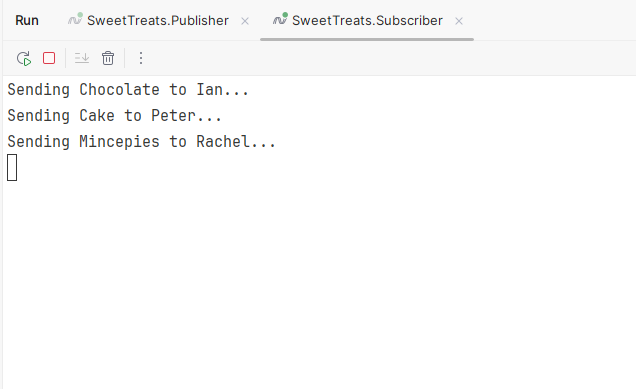
Its looking good...
In my example I set up the topic and subscriptions via console, but all of it can be done using the client library as well.
Push Subscriptions
With push subscriptions, the Pub/Sub service initiates requests to your subscriber application to deliver messages. Messages are delivered to a publicly addressable server or a webhook. The service sends each message as an HTTP POST request to the subscriber client at a preconfigured endpoint. The endpoint must ack the message using an HTTP success status code(102, 200, 201, 202, 204). A non-success response indicates that the service must resend the messages. The service dynamically adjusts the rate of the push requests based on the rate at which it receives a successful response. The message is by default wrapped and sent in the JSON body of the HTTP POST. If sent unwrapped, then the raw message is sent in the request body to the webhook. This is a configuration in the subscription itself. When using the push subscription, the ackdeadline of individual messages cannot be modified on a per-message basis.
Now, let's talk about some of the delivery options available.
Flow Control
While flow control on the publisher is not supported in C#, the library supports flow control on the subscriber end. Flow control lets the subscriber regulate the rate at which the messages are ingested. This helps in handling transient spikes without driving up costs or until the subscriber is scaled up. If you have a persistent high rate, consider scaling out subscribers.
Dead-letter Topics
Pub/Sub can move any undeliverable messages that subscribers cannot acknowledge to a dead-letter topic. This is a configuration that can be enabled on the subscription at the time of creating a subscription. The maximum number of delivery attempts for messages can be specified on the subscription. It defaults to 5. When the number of delivery attempts on a message exceeds the configured number of delivery attempts, the message is moved into a dead-letter topic. When a message is forwarded to a dead-letter topic, it is wrapped in a new message with attributes that identify the source subscription added to it. A separate subscription attached to the dead-letter topic can then be used for debugging and analysis of the messages. Pub/Sub only counts delivery attempts when a dead-letter topic is configured.
Subscription Retry Policy
If a subscriber cannot acknowledge a message, the Pub/Sub service tries to resend the message. This redelivery attempt is configured as the subscription retry policy. There are two types of policies - immediate retry and retry after an exponential backoff delay. The default option is immediate retry.
On my subscription, I have enabled dead lettering and subscription retry. When enabled, you need to specify the dead letter topic to publish the messages that cannot be delivered. The dead letter topic and a subscription to the dead letter topic have to be created and specified while enabling dead lettering. But the console UI can guide you through it.
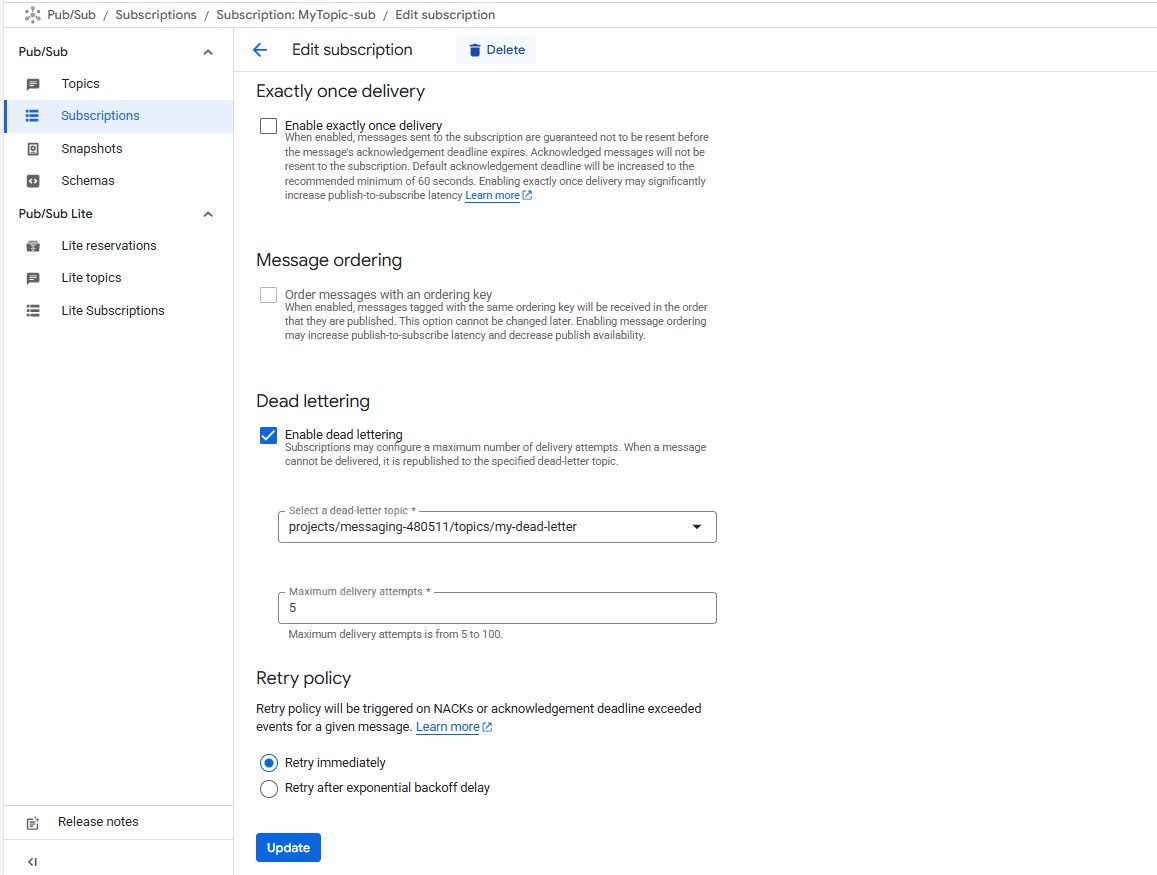
In my example, I have enabled dead lettering after 5 delivery attempts. And in my code, I have a bit of logic to negatively acknowledge any person's name starting with "V". So let me try sending some cakes to Voldemort. Because, why not?
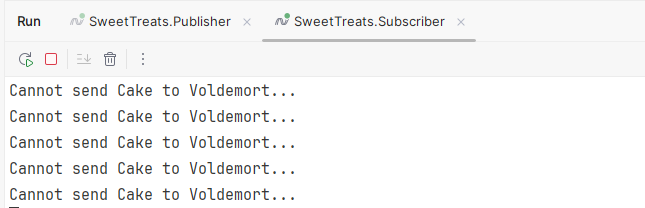
You can see that the retry is immediate because immediate retry is the default option on subscriptions.
Replay and purge messages with seek
The Seek feature helps extend subscriber capabilities by allowing the alteration of the ack state of messages in bulk. With this feature, a subscriber can replay previously acknowledged messages, process them or purge messages in bulk. To use this feature, message retention must be configured on a topic, and subscriptions must be configured to retain acknowledged messages. When topics are configured to retain messages, all messages, regardless of their ack state, are retained for a maximum of 31 days. With message retention enabled, subscriptions created at a later date can replay messages that were published prior to subscription creation.
Seek can be performed to a timestamp or in combination with a snapshot. Seeking to a timestamp marks all the messages before the timestamp as acknowledged. A snapshot is a point-in-time view of the ack state of a subscription. A snapshot records the ack state of all the messages within a subscription at the point of creation. All unacked messages of the source subscription at the time of creation of the snapshot are retained, and any messages published to the topic after a snapshot has been created. The maximum lifetime of a snapshot is 7 days.
Pricing Model
Pub/Sub service charges are based on usage - throughput cost for message publishing and delivery, data transfer cost and storage cost with message retention. More information on the costs can be found at https://cloud.google.com/pubsub/pricing


Understanding the concepts behind asynchronous messaging
Understanding the concepts behind asynchronous messaging